Key Takeaways
- Speakr is a free, open-source, self-hosted platform for transcribing audio, giving users full control over their data and privacy.
- It supports various transcription engines, including local WhisperX (requiring a GPU for free operation) and cloud APIs like OpenAI, offering flexibility in accuracy and cost.
- Beyond basic transcription, Speakr provides advanced AI features like speaker diarization, automatic summaries, semantic search, and per-recording chat.
- Deployment is streamlined using Docker, making it accessible for tech-savvy individuals and teams to set up on their own infrastructure.
In a world increasingly reliant on digital communication and information, transcribing audio content has become a fundamental need. From important meetings and insightful interviews to personal voice notes and academic lectures, converting spoken words into text unlocks a wealth of possibilities for organization, searchability, and analysis. While numerous cloud-based transcription services offer convenience, they often come with a trade-off: handing over sensitive audio data to third-party servers and incurring ongoing subscription costs.
This is where Speakr steps in as a compelling alternative. Speakr is a free, open-source, self-hosted AI transcription platform designed specifically for individuals and teams who prioritize privacy, data ownership, and cost control. It lets you process your audio content entirely on your own infrastructure, ensuring sensitive conversations never leave your control.
What is Speakr and Why Self-Hosting Matters?
Speakr is a web application that transforms audio and video recordings into organized, searchable, and AI-powered notes. Developed by Murtaza Nasir, this project addresses a critical gap for privacy-conscious users: the ability to leverage powerful AI transcription technology without sacrificing control over their data.
The core appeal of Speakr lies in its self-hosted nature. Unlike commercial services such as Otter.ai, which require you to upload your audio to their cloud servers, Speakr runs on your own hardware. This means your recordings and their transcripts remain on your server, under your direct management. For professionals dealing with confidential interviews, NDA-covered discussions, or personal research, this level of data ownership is not just a preference, but a necessity.
Beyond privacy, self-hosting can also offer long-term cost advantages. While Speakr itself is free and open-source, the choice of transcription backend can influence operational costs. If configured to use a self-hosted WhisperX backend with a GPU, you can achieve high-accuracy transcription and diarization without any per-minute API fees, making it a truly free solution for processing audio.
How Speakr Works: A High-Level Overview
Speakr is built for ease of deployment, primarily relying on Docker and Docker Compose. This containerization approach simplifies the setup process, allowing users to get the platform running on Linux, macOS, or Windows with consistent results. The architecture is connector-based, meaning it can interface with various transcription engines, offering flexibility in terms of accuracy, speed, and cost.
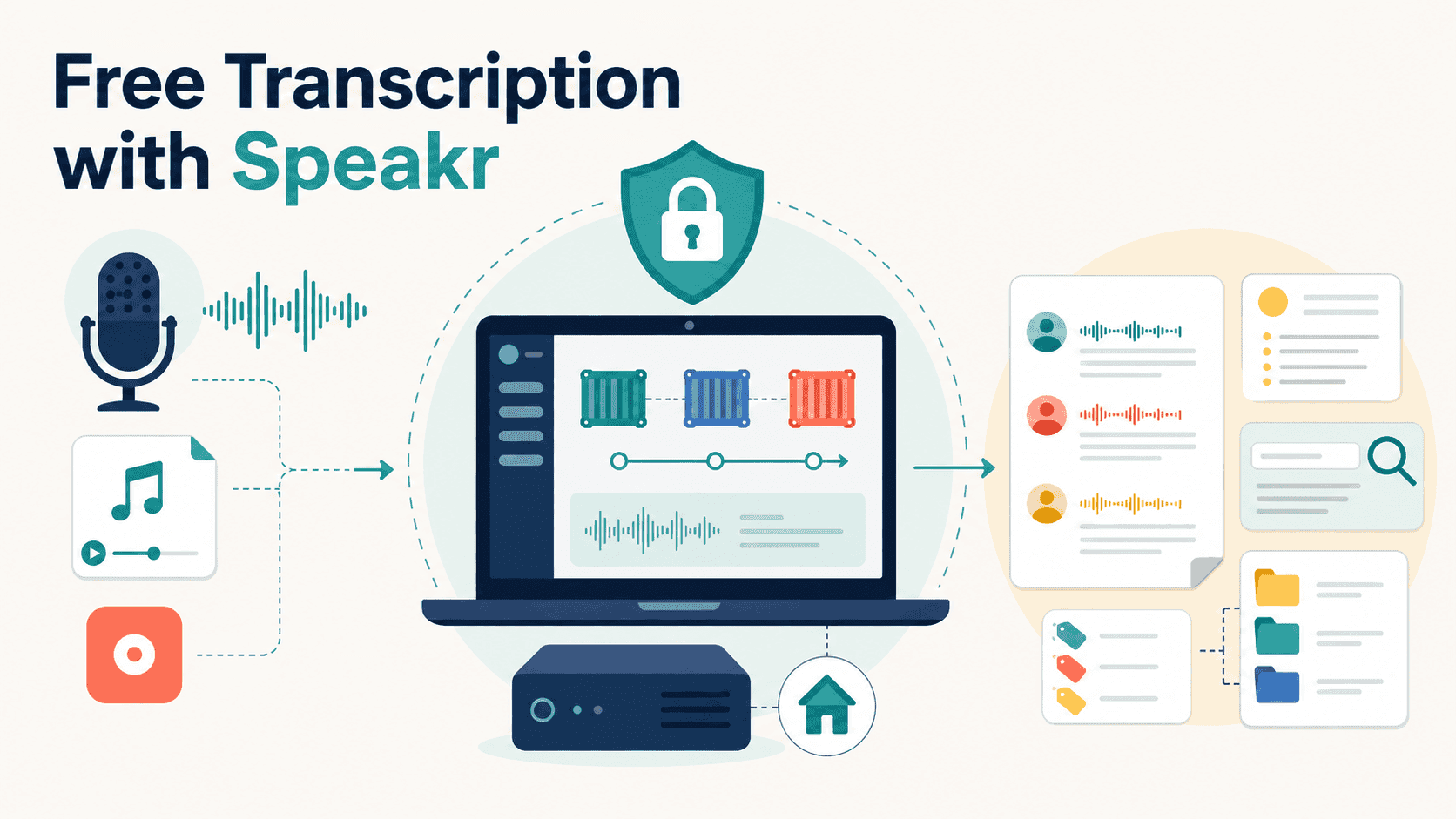
At its heart, Speakr processes audio through a pipeline that involves several steps:
- Audio Ingestion: Users can either record audio directly within Speakr's web interface (using their microphone, system audio, or both) or upload existing audio files in common formats like MP3, M4A, or WAV. There's also an option for auto-importing files from a designated "watched folder" on the server, ideal for batch processing.
- Transcription: Once audio is ingested, Speakr sends it to the configured transcription engine. This could be a self-hosted WhisperX instance running on your GPU for maximum privacy and no API costs, or a third-party cloud API like OpenAI's Whisper, AssemblyAI, or Deepgram for convenience.
- Diarization & Speaker Identification: Many of the supported engines, especially WhisperX, offer speaker diarization, which identifies and labels different speakers in a conversation. Speakr enhances this with voice profiles and contextual speaker labeling.
- AI-Powered Insights: After transcription, Speakr leverages AI to generate automatic summaries, extract key events, and enable natural language chat directly with your recordings. This transforms raw transcripts into organized, searchable, and actionable knowledge.
The entire process takes place within your self-hosted environment, ensuring that your audio data and the resulting transcripts remain under your control. The web-based interface is a Progressive Web App (PWA), making it accessible and mobile-friendly across various devices.
Key Features of Speakr
Speakr offers a robust set of features that go beyond simple audio-to-text conversion, making it a powerful tool for managing spoken information:
- High-Accuracy Transcription with Speaker Diarization: Leveraging advanced models like OpenAI's Whisper family, Speakr delivers transcription accuracy comparable to leading commercial services. Its speaker diarization capabilities, particularly when paired with a WhisperX backend, accurately identify and label different speakers, providing clear, segmented transcripts for multi-person conversations.
- Flexible Transcription Backend Support: Speakr's connector-based architecture allows you to "bring your own engine." You can choose from various providers including self-hosted WhisperX (for complete privacy and no API costs), OpenAI's API (
gpt-4o-transcribe-diarize,whisper-1), Mistral Voxtral, VibeVoice, Azure OpenAI, Deepgram, and AssemblyAI. This flexibility lets you balance privacy, performance, and cost based on your specific needs. - Intelligent Note-Taking and AI Insights: Speakr is designed to transform transcripts into actionable knowledge. Features include:
- Automatic Summaries: AI-generated summaries with bullet points, key takeaways, and next steps, with customizable prompts.
- Event Extraction: Automatically surfaces action items and calendar-worthy events from your transcripts.
- Per-Recording Chat: Ask questions about a single recording in a floating panel, with answers citing transcript timestamps for easy playback.
- Inquire Mode: A powerful semantic search and natural-language chat feature that allows you to query your entire library of recordings at once, acting as an "AI researcher."
- Diverse Recording and Ingestion Methods:
- In-Browser Recorder: Capture live audio directly from your microphone, system audio, or both, with platform-specific guides for virtual audio devices.
- File Uploads: Supports a wide range of audio formats and configurable file size limits.
- Watched Folders: Automatically processes audio files dropped into a designated server folder, perfect for batch workflows.
- Video Capture: While transcription focuses on audio, Speakr can record shared tabs, windows, or screens as video that plays alongside the transcript, useful for documenting presentations or calls.
- Automation and Integration: Speakr includes a Phase 1-3 webhook system with HMAC signing and exponential-backoff retry, enabling integration with popular automation tools like n8n, Zapier, and Make. This allows for seamless workflows, such as automatically pushing transcripts to other applications.
- User Interface and Accessibility: The platform offers a clean, intuitive web interface that functions as a Progressive Web App (PWA), ensuring a smooth experience on both desktop and mobile devices. It also supports seven fully localized languages, including English, French, German, Spanish, Russian, Simplified Chinese, and Brazilian Portuguese.
- Data Management Features: Speakr provides features like clickable timestamps in transcripts (to jump to specific audio moments), automatic title generation, and the ability to merge multiple recordings into a single, cohesive transcript. It also supports transcription templates for reusable prompts and hotwords.
Setting Up Speakr: A Conceptual Guide
Getting Speakr up and running involves a few key steps, primarily centered around Docker:
- Prerequisites: You'll need Docker and Docker Compose installed on your system. These tools manage the containerized environment that Speakr runs in. Depending on your chosen transcription backend, you might also need an API key for services like OpenAI or OpenRouter. For self-hosted WhisperX with diarization, a GPU is recommended for performance, and an additional ASR service container will be required.
- Create Project Directory: Start by creating a dedicated directory for your Speakr installation and navigating into it.
- Download Configuration Files: Fetch the
docker-compose.ymland.envconfiguration files from Speakr's official GitHub repository. These files define how Speakr's services run and store your environment variables. - Configure Environment Variables: Edit the
.envfile to set up your desired transcription provider (e.g., specifying an OpenAI API key or the URL for a self-hosted ASR service), configure your admin account details, and adjust any other settings like watched folders or storage paths. - Launch Speakr: With the configuration complete, you can start Speakr using a simple Docker Compose command. This will pull the necessary Docker images and launch the Speakr application.
- Access Speakr: Once the containers are running, you can access Speakr through your web browser, typically at a specified local address (e.g.,
http://localhost:8000).
For detailed, step-by-step instructions and troubleshooting, the official Speakr documentation and GitHub repository are invaluable resources.
Cost Considerations: The Nuance of "Free"
While Speakr is proudly free and open-source, it's important to understand the nuances of its "free" nature regarding operational costs.
Speakr itself does not have a subscription fee. However, its multi-backend architecture means that if you opt to use cloud-based transcription APIs (like OpenAI, AssemblyAI, Deepgram, etc.), you will incur per-minute usage fees directly from those providers. These costs can add up, especially for heavy transcription users.
The truly "free" transcription experience, in terms of eliminating external API costs, comes from setting up a self-hosted WhisperX backend. This configuration processes audio locally on your server. The primary "cost" here is the initial investment in hardware capable of running WhisperX efficiently, specifically a GPU. While a CPU-only setup might be possible, a GPU significantly speeds up the transcription process, making it practical for regular use.
Therefore, when considering Speakr, users should weigh the benefits of complete privacy and no recurring fees against the potential need for a GPU-equipped server for the fully self-contained, free experience.
Who is Speakr For?
Speakr is an excellent choice for a diverse range of users:
- Privacy-Conscious Professionals: Journalists, lawyers, medical professionals, and researchers who handle sensitive information and cannot risk uploading their audio to third-party cloud services.
- Developers and Tech Enthusiasts: Individuals who enjoy self-hosting applications, have access to server hardware (especially with a GPU), and want full control over their tools and data.
- Teams and Small Businesses: Organizations that want an in-house transcription solution to maintain data sovereignty, potentially reducing long-term costs compared to recurring cloud subscriptions.
- AI Practitioners and Researchers: Those who want to experiment with different ASR models and integrate transcription into custom workflows via webhooks.
- Anyone Seeking Data Ownership: Users who are tired of subscription models and want to own their data outright, turning their spoken content into a searchable, personal knowledge base.
Conclusion
Speakr represents a significant step forward for private, self-hosted AI transcription. By combining the power of modern AI speech-to-text models with an open-source, Docker-deployable architecture, it empowers users to take back control of their audio data. Whether you're a professional safeguarding sensitive conversations or a tech enthusiast building your personal knowledge stack, Speakr offers a robust, flexible, and genuinely private solution to the challenge of audio transcription. It's an investment in your data's future, allowing you to transcribe, organize, and understand your spoken content without compromise.
Frequently Asked Questions
What is the main benefit of using Speakr over cloud-based transcription services?
The main benefit of Speakr is complete data ownership and privacy. Your audio recordings and their transcripts remain on your own server, meaning sensitive information never leaves your control or touches third-party cloud infrastructure.
Is Speakr truly free, or are there hidden costs?
Speakr itself is free and open-source. However, while the core platform is free, the actual transcription process can incur costs if you opt to use external cloud-based transcription APIs (like OpenAI's Whisper API). To achieve truly free transcription without any API costs, you need to set up a self-hosted WhisperX backend, which typically requires a dedicated GPU for efficient processing.
What kind of hardware do I need to run Speakr effectively?
Speakr can be deployed on various systems using Docker. For basic functionality, a server with at least 2GB RAM and 10GB disk space is recommended. However, if you plan to use the self-hosted WhisperX backend for speaker diarization and optimal performance, especially with longer or multi-speaker files, a system with a powerful GPU is highly recommended.
Can Speakr identify different speakers in a recording?
Yes, Speakr supports speaker diarization, which identifies and labels different speakers in your recordings. This feature is particularly effective when using the WhisperX backend or certain cloud APIs like OpenAI's gpt-4o-transcribe-diarize model, and it can be enhanced with voice profiles and contextual labeling within Speakr.