Key Takeaways
- Building a local AI stack with Small Language Models (SLMs) offers privacy, cost savings, and low latency for AI practitioners.
- The stack typically involves layers for model serving (e.g., Ollama, LM Studio), context retrieval (vector databases like ChromaDB, LanceDB, FAISS), and orchestration (LangChain, LlamaIndex).
- Choosing the right tools for each layer is crucial for a productive local AI setup, balancing performance, ease of use, and specific project needs.
- Many foundational tools for local AI are open-source and free for local use, with commercial options for cloud hosting or advanced features.
Building Your Own Local AI Stack for Productive Small Language Models
The world of Artificial Intelligence is moving fast, and while massive cloud-based Large Language Models (LLMs) grab the headlines, a powerful and practical trend is quietly empowering developers and practitioners: the rise of the local AI stack. Specifically, the ability to run Small Language Models (SLMs) directly on your own hardware is changing how we approach AI development, offering significant advantages in privacy, cost, and speed.
This article will dive deep into what a local AI stack for SLMs means, why it matters, and how you can assemble the right tools at each layer—from serving your chosen model to retrieving relevant context—to build a truly productive local AI setup.
What Are Small Language Models (SLMs) and Why Go Local?
Small Language Models (SLMs) are compact versions of larger AI language systems. They typically range from a few million to several billion parameters, making them much lighter than the hundreds of billions found in models like GPT-4. Despite their smaller size, SLMs can deliver impressive performance on specific tasks, especially when fine-tuned for a particular domain or workflow.
Running these models locally, on your own machine (laptop, desktop, or even edge devices), provides a host of benefits:
- Privacy and Security: Your data stays on your machine and never leaves your control. This is critical for sensitive information, proprietary data, or projects with strict compliance requirements.
- Cost Efficiency: Say goodbye to recurring API fees or expensive cloud GPU rentals. Once your hardware is in place, the operational cost is primarily electricity.
- Low Latency: Local inference removes network delays, leading to instant responses and a much smoother user experience.
- Offline Access: Work on your AI projects anywhere, anytime, without needing an internet connection.
- Customization and Control: You have complete control over the models, their configurations, and the entire environment, allowing for deep customization and fine-tuning.
For individuals and teams building prototypes, working with confidential data, or deploying AI in environments with limited connectivity, local SLMs are a game-changer.
Understanding the Local AI Stack Layers
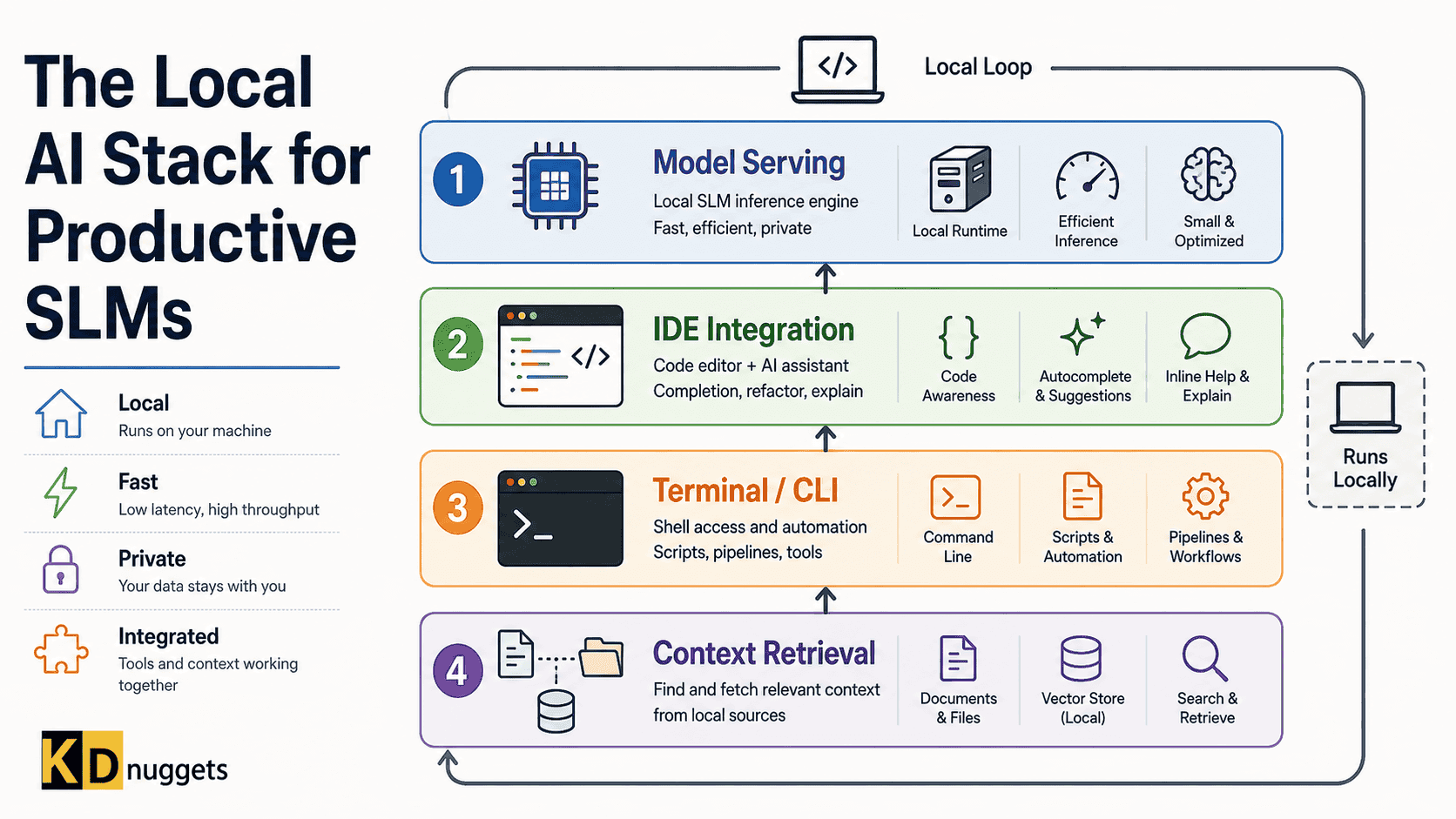
A productive local AI setup isn't just about running a model; it's about building a coherent system. The local AI stack can be broken down into several key layers, each with a specific role:
- Model Serving: This layer handles loading and running your chosen SLM, making it accessible for applications.
- Context Retrieval (RAG - Retrieval Augmented Generation): For SLMs to provide intelligent and informed answers, they often need access to external, up-to-date, or private information. This layer manages that data and retrieves relevant pieces to feed into the model.
- Orchestration/Frameworks: These tools help you tie everything together, build complex AI applications, manage workflows, and interact with different components of your stack.
- Embedding Models: While often integrated into the context retrieval layer, these models are crucial for converting text into numerical vectors that vector databases can understand and search.
Deep Dive into Each Layer with Specific Tools
1. Model Serving: Bringing SLMs to Life Locally
This layer is where your SLM actually runs. Tools here simplify the process of downloading, managing, and executing models, often providing an API for your applications to interact with.
-
Ollama:
Ollama is an incredibly popular open-source tool that makes running LLMs locally straightforward. Think of it as "Docker for LLMs." It simplifies the process of downloading various SLMs (and larger LLMs), running them, and managing them via a command-line interface or an OpenAI-compatible API.
- Developer: Ollama is an open-source project.
- Release Date: It has seen rapid development, with major releases in 2025 and 2026, including a native desktop application for macOS and Windows.
- Features:
- Easy model download and management.
- Supports a wide range of models in the GGUF format.
- Provides an OpenAI-compatible API endpoint for chat, completion, and embeddings, allowing seamless integration with existing tools and workflows.
- Optimized for various hardware, including Apple Silicon, x86 architectures with AVX/AVX2/AVX512, and GPU acceleration via CUDA.
- Offers both local (free) and cloud inference options (Ollama Cloud).
- Pricing: Ollama's local software is completely free and open-source under the MIT License for unlimited use on your own hardware. Ollama also offers cloud services with tiered pricing: a Free tier with light cloud usage, a Pro plan at $20/month or $200/year, and a Team plan starting at $125/month for shared billing and administration.
- Official Website | GitHub Repository
-
LM Studio:
LM Studio provides a user-friendly desktop application (for macOS, Windows, and Linux) to discover, download, and run open-source LLMs locally. It's often praised for its graphical interface, making it accessible even for those less comfortable with command lines.
- Developer: LM Studio (US-based company).
- Release Date: Launched in May 2023.
- Features:
- Intuitive GUI for browsing and downloading models.
- Runs models entirely on personal computers with no cloud reliance.
- Supports document-based RAG, local APIs, and SDKs.
- Bundles `llama.cpp` and MLX for optimized performance.
- Offers a "Secure Cloud" option for larger models that might not fit locally, billed in prepaid credits.
- Pricing: LM Studio is completely free for both personal and commercial use, with no subscription fees, usage charges, or per-token costs for its core functionality. Users only pay for their own hardware.
- Official Website
-
llama.cpp:
This is the foundational C/C++ library that many local inference tools, including Ollama and LM Studio, are built upon. Developed by Georgi Gerganov,
llama.cppfocuses on enabling efficient LLM inference with minimal setup and state-of-the-art performance across a wide range of hardware, even on CPUs without dedicated GPUs.- Developer: Georgi Gerganov and community (open-source).
- Release Date: Began development in March 2023.
- Features:
- Pure C/C++ implementation with zero external dependencies.
- Highly optimized for various hardware, including Apple Silicon (ARM NEON, Accelerate, Metal), x86 architectures (AVX, AVX2, AVX512, AMX), and GPUs (CUDA, HIP, Vulkan, SYCL).
- Supports various quantization techniques (e.g., 2-bit to 8-bit, GGUF format) to dramatically reduce memory footprint and enable larger models on less powerful hardware.
- Includes command-line tools and an OpenAI-compatible API server.
- Pricing: Free and open-source under the MIT License.
- GitHub Repository
2. Context Retrieval (RAG): Giving SLMs Knowledge
Retrieval Augmented Generation (RAG) is a technique where an LLM retrieves information from an external knowledge base before generating a response. For local SLMs, this means having a local way to store and quickly search your documents or data. This layer often involves vector databases and embedding models.
Vector Databases: Storing and Searching Embeddings
Vector databases store numerical representations (embeddings) of your data, allowing for fast similarity searches. When a user asks a question, the question is also converted into an embedding, and the database finds the most similar document chunks.
-
ChromaDB:
Chroma is an open-source AI-native embedding database. It's designed to be easy to use and integrates well with popular AI frameworks.
- Developer: Chroma is an open-source project.
- Features:
- Supports embedding generation and storage.
- Offers a simple API for adding and querying data.
- Designed for local-first development and can scale to cloud environments.
- Integrates with LangChain and LlamaIndex.
- Pricing: Chroma is open-source and free to use. They also offer Chroma Cloud for managed deployments.
- Official Website | GitHub Repository
-
LanceDB:
LanceDB is a developer-friendly, open-source embedded retrieval library for multimodal AI, built on the Lance columnar format. It's designed for efficient storage and analytics of vectors, metadata, and multimodal data.
- Developer: LanceDB (open-source project with commercial offerings).
- Features:
- Fast vector search, supporting billions of vectors in milliseconds.
- Comprehensive search with vector similarity, full-text, and SQL capabilities.
- Multimodal support: stores and queries text, images, videos, and more alongside embeddings and metadata.
- Advanced features like zero-copy, automatic versioning, and GPU support for index building.
- Seamless integration with Python, Node.js, Rust, LangChain, and LlamaIndex.
- Pricing: The open-source and local version is free. LanceDB Enterprise offers production-scale vector search, starting from $779/month, with custom pricing for larger annual commitments.
- Official Website | GitHub Repository
-
FAISS (Facebook AI Similarity Search):
Developed by Meta AI, FAISS is a library for efficient similarity search and clustering of dense vectors. It's written in C++ with Python wrappers and includes GPU implementations for some algorithms.
- Developer: Meta Platforms (Meta AI).
- Release Date: First released on February 22, 2017.
- Features:
- Contains various indexing methods for similarity search, optimizing memory, speed, and accuracy.
- Supports searching in vector sets of any size, even those that don't fit in RAM.
- Focuses on Euclidean distance and inner product distance (which can be used for cosine similarity).
- Includes supporting code for evaluation and parameter tuning.
- Integrates with frameworks like Haystack and LangChain.
- Pricing: Free and open-source under the MIT License.
- Official Website | GitHub Repository
Embedding Models: Turning Text into Vectors
Embedding models convert raw text (or other data) into numerical vectors. These vectors capture the semantic meaning of the text, allowing vector databases to find similar pieces of information.
- Popular Local Embedding Models:
all-MiniLM-L6-v2: A lightweight, CPU-friendly option for fast and cost-free retrieval.nomic-embed-text: Offers higher-quality retrieval, especially for longer or complex documents, and can be pulled from Ollama.bge-m3(BAAI): A strong open-source choice for multilingual retrieval, supporting over 100 languages with an 8K context.Qwen3-Embedding-0.6B: Provides good quality per VRAM, is Ollama-native, and scales up to 8B if you have the GPU.
When choosing an embedding model, consider factors like retrieval quality, latency, vector dimensionality, domain fit, and licensing.
3. Orchestration/Frameworks: Building Intelligent Applications
These frameworks help developers build sophisticated AI applications by providing tools to chain together different components (LLMs, vector databases, other tools) and manage complex workflows.
-
LangChain:
LangChain is a widely used open-source framework for building applications with LLMs. It simplifies the creation of AI agents and complex workflows by breaking down tasks into actionable steps and allowing communication between different models and data sources.
- Developer: LangChain (open-source project with commercial offerings).
- Release Date: Continuously developed and updated. Last updated June 2026.
- Features:
- Composable framework for building LLM-powered applications.
- Main components include LLMs, prompt templates, AI agents, retrieval models, and knowledge bases.
- Enables complex workflow automation and model communication.
- Integrates with various LLM providers, vector stores, and data loaders.
- Pricing: The LangChain framework itself is free and open-source under the MIT License. LangChain also offers LangSmith, an observability and evaluation platform, which has a Developer (free) tier with 5,000 traces/month, a Plus tier at $39/user/month (up to 10 users) with 10,000 traces/month, and custom Enterprise plans. Overage charges apply for additional traces and other services.
- Official Website | GitHub Repository
-
LlamaIndex:
LlamaIndex is a data framework for LLM applications, focusing on making it easier to ingest, structure, and access private or domain-specific data with LLMs. It's particularly strong for RAG applications.
- Developer: LlamaIndex (open-source framework with commercial platform).
- Release Date: Continuously developed.
- Features:
- Provides tools to connect custom data sources (documents, databases, APIs) to LLMs.
- Offers various data connectors, data indexing strategies, and query interfaces.
- Optimized for RAG workflows, making it easier to build "chat with your data" applications.
- Integrates with many vector databases and LLM providers.
- Pricing: The LlamaIndex open-source framework is free to use. LlamaIndex also offers LlamaCloud, a managed platform for document parsing, extraction, and indexing, which operates on a credit-based system (1,000 credits = $1.25). They offer a Free plan with 10,000 credits/month, a Starter plan at $50/month with 40,000 credits, and a Pro plan at $500/month with 500,000 credits.
- Official Website | GitHub Repository
Building Your Own Local AI Stack: A High-Level Guide
Putting these pieces together involves a few steps:
- Choose Your Hardware: While many SLMs can run on consumer-grade hardware, more RAM and VRAM will allow you to run larger models or achieve better performance. Apple Silicon Macs are often highly optimized for local AI.
- Select a Model Serving Tool: Start with Ollama or LM Studio for ease of use. Download a suitable SLM (e.g., a 7B parameter model in GGUF format) that fits your hardware.
- Prepare Your Data for RAG: If you want your SLM to answer questions about your own documents, you'll need to:
- Chunk Your Documents: Break down large documents into smaller, manageable pieces.
- Generate Embeddings: Use an embedding model (e.g.,
all-MiniLM-L6-v2orbge-m3) to convert these text chunks into numerical vectors. - Store in a Vector Database: Use ChromaDB, LanceDB, or FAISS to store these embeddings.
- Integrate with an Orchestration Framework: Use LangChain or LlamaIndex to connect your model server, vector database, and any other tools. This is where you'll define how your application processes user queries, retrieves context, and feeds it to the SLM.
- Develop Your Application: Build a user interface (e.g., a web app, a desktop app, or a simple script) that interacts with your orchestration framework.
This framework gives you the flexibility to swap components as your needs evolve. The local AI ecosystem is maturing rapidly, offering robust and well-documented options at every layer.
Who is This Local AI Stack For?
This approach is ideal for:
- Software Developers and AI Practitioners: Who want full control over their AI deployments, experiment with different models, and build custom applications.
- Freelancers and Small Businesses: Looking to integrate AI capabilities into their workflows without incurring high cloud costs or compromising data privacy.
- Researchers and Educators: Who need to explore AI models and techniques in a controlled, cost-effective environment.
- Anyone Concerned About Data Privacy: For applications handling sensitive personal, financial, or proprietary information.
By investing a little time in understanding and assembling a local AI stack, you unlock a powerful, private, and cost-effective way to leverage the growing potential of Small Language Models.
Frequently Asked Questions
What is the main benefit of running an AI stack locally instead of using cloud services?
The main benefits of running an AI stack locally include enhanced data privacy and security (as your data never leaves your machine), significant cost savings by avoiding API fees and cloud infrastructure costs, lower latency for faster responses, and the ability to work offline.
Are Small Language Models (SLMs) as powerful as Large Language Models (LLMs)?
SLMs are typically not as powerful as the largest LLMs for very broad or complex open-ended tasks. However, they are highly efficient and can often outperform larger models on specific, focused tasks, especially when fine-tuned with domain-specific data. They offer a better balance of performance, speed, and resource efficiency for local deployment.
Do I need powerful hardware to run a local AI stack?
While more powerful hardware (especially a good GPU with ample VRAM) will allow you to run larger and more capable models, many SLMs are designed to run efficiently on consumer-grade hardware, including CPUs. Tools like llama.cpp and Ollama are optimized to make the most of available resources, even on machines without dedicated GPUs or with Apple Silicon.
What is Retrieval Augmented Generation (RAG) and why is it important for local AI?
Retrieval Augmented Generation (RAG) is a technique that allows an AI model to retrieve information from an external knowledge base (like your own documents) before generating a response. It's crucial for local AI because it enables SLMs to provide accurate, up-to-date, and contextually relevant answers based on your private data, overcoming the limitations of their pre-trained knowledge.