Key Takeaways
- Build an AI web scraper in Python by combining
requestsfor fetching,BeautifulSoupfor HTML cleaning, andmarkdownifyfor content conversion. - Leverage Large Language Models (LLMs) like OpenAI, Anthropic, or Google Gemini to turn cleaned web content into a focused Question-Answering (QA) engine.
- Reduce LLM token usage and improve answer quality by stripping irrelevant HTML elements and converting content to a concise Markdown format.
- The tutorial provides a step-by-step guide for developers to create a robust and efficient AI-powered web scraping solution.
How to Build a Simple AI Web Scraper with Python for Focused QA
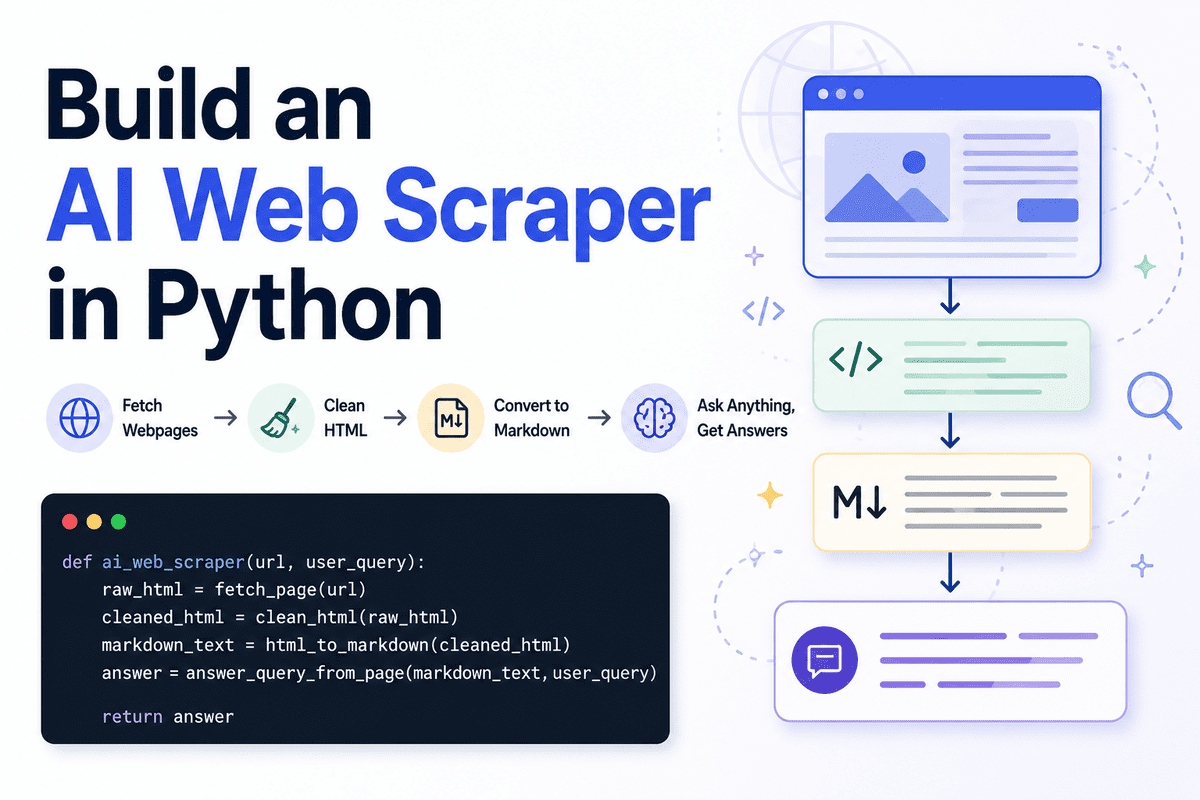
Web scraping is a powerful technique for gathering data from the internet. However, traditional scrapers often collect a lot of noise – advertisements, navigation menus, footers, and other irrelevant elements that clutter the actual content you're interested in. When you combine this with the power of Large Language Models (LLMs), feeding them raw, messy HTML can lead to increased token usage and less accurate answers. This tutorial will show you how to build a smart, efficient AI web scraper using Python. Our goal is to transform any webpage into a lightweight, LLM-powered Question-Answering (QA) engine. We'll achieve this by cleaning HTML, converting the content to a streamlined Markdown format, and then using an LLM to extract focused answers, all while keeping your token usage in check. This approach is perfect for developers looking to build intelligent data extraction tools or enhance their AI applications with targeted web content.Why an AI-Powered Web Scraper?
Imagine you need to quickly find specific information from a blog post, a product page, or a news article. Instead of manually sifting through the page, you can ask an AI model a question and get a direct answer. This is where an AI web scraper shines. By preprocessing the web content, we make it easier for the LLM to understand the context and retrieve precise information, significantly improving the quality and relevance of its responses. Plus, by reducing the "noise" in the input, you save on LLM API costs, which are typically token-based.Step 1: Setting Up Your Python Environment
Before we write any code, we need to set up a clean and organized Python environment. Using a virtual environment is a best practice as it isolates your project's dependencies from your system's global Python packages.Create a Virtual Environment
Open your terminal or command prompt and navigate to your project directory. Then, run the following commands:
python3 -m venv ai_scraper_env
source ai_scraper_env/bin/activate  # On Windows, use `ai_scraper_env\Scripts\activate`
You'll see (ai_scraper_env) appear at the beginning of your prompt, indicating that your virtual environment is active.
Install Necessary Libraries
We'll need a few Python libraries to handle fetching web content, parsing HTML, converting to Markdown, and interacting with an LLM:
requests: For making HTTP requests to fetch webpage content.BeautifulSoup4: For parsing and navigating HTML, allowing us to clean up unwanted tags.markdownify: For converting cleaned HTML into Markdown.- An LLM client library: Depending on your choice (e.g.,
openai,anthropic,google-generativeai).
pip install requests beautifulsoup4 markdownify openaiFor this tutorial, we'll use OpenAI as an example LLM provider, but the principles apply to others like Anthropic's Claude or Google's Gemini. Make sure to install the specific client library for your chosen LLM if it's different from OpenAI.
Step 2: Fetching Webpage Content
The first step in our scraper is to get the raw HTML content of a webpage. The requests library, developed by Kenneth Reitz and now maintained by the Python Software Foundation, makes this incredibly straightforward.
import requests

def fetch_html(url):
    try:
        response = requests.get(url)
        response.raise_for_status()  # Raise an exception for HTTP errors (4xx or 5xx)
        return response.text
    except requests.exceptions.RequestException as e:
        print(f"Error fetching URL {url}: {e}")
        return None

# Example usage:
# url = "https://www.example.com/blog-post"
# html_content = fetch_html(url)
# if html_content:
#     print("HTML fetched successfully!")
The fetch_html function takes a URL, sends an HTTP GET request, and returns the page's HTML content as a string. It also includes basic error handling for network issues or bad responses.
Step 3: Cleaning HTML with BeautifulSoup
Once we have the HTML, the next crucial step is to remove all the irrelevant parts. This includes scripts, style tags, navigation bars, footers, sidebars, and anything else that isn't core content. BeautifulSoup, created by Leonard Richardson, is an excellent tool for parsing HTML and XML documents, even malformed ones.
from bs4 import BeautifulSoup

def clean_html(html_content):
    if not html_content:
        return ""

    soup = BeautifulSoup(html_content, 'html.parser')

    # Remove unwanted tags and their content
    for selector in [
        'script', 'style', 'header', 'footer', 'nav', 'aside',
        '.sidebar', '.ad', '.ads', '.advertisement', '#comments',
        'form', 'iframe', 'noscript', 'meta', 'link', 'img[alt=""]' # Remove empty alt images
    ]:
        for element in soup.select(selector):
            element.decompose() # Removes the tag and its content

    # Keep only the main content area if identifiable
    # This is a heuristic and might need adjustment per website
    main_content_tags = soup.find_all(['article', 'main', {'div': 'content'}, {'div': 'main-content'}])
    if main_content_tags:
        # Prioritize 'article' or 'main', otherwise take the largest div with 'content' or 'main-content'
        best_content = None
        max_len = 0
        for tag in main_content_tags:
            tag_text = tag.get_text(separator=" ", strip=True)
            if len(tag_text) > max_len:
                max_len = len(tag_text)
                best_content = tag
        if best_content:
            return str(best_content)

    # If no specific main content found, return the body content after cleaning
    return str(soup.body) if soup.body else str(soup)
The clean_html function:
- Parses the HTML using
BeautifulSoup. - Iterates through a list of common selectors for irrelevant elements (like
script,style,nav, etc.) and removes them usingdecompose(). - Attempts to identify the main content area (e.g.,
<article>,<main>tags or specificdivs) to further narrow down the focus. This step is a heuristic and might need customization for different websites. - Returns the cleaned HTML as a string.
Step 4: Converting HTML to Markdown
Raw HTML, even cleaned, can still contain many tags that are unnecessary for an LLM. Converting it to Markdown provides a much cleaner, more readable, and concise text format. The markdownify library, available on GitHub, is perfect for this task.
from markdownify import markdownify as md
def convert_to_markdown(cleaned_html):
if not cleaned_html:
return ""
# Customize markdownify options for better LLM input
# e.g., strip links, convert images to alt text, ensure clean paragraphs
markdown_content = md(
cleaned_html,
heading_style="ATX", # Use # for headings
strip=['a'], # Remove links, just keep the text
newline_style="CR", # Consistent newlines
wrap=True, # Wrap text paragraphs
wrap_width=80, # Wrap at 80 characters
# You might want to keep images if their alt text is descriptive:
# default_title=True, # Use alt text as title for images
# keep_inline_images=True # Keep images as markdown 
)
# Further clean up common markdown artifacts or excessive whitespace
markdown_content = "\n".join([line.strip() for line in markdown_content.splitlines() if line.strip()])
return markdown_contentThe convert_to_markdown function takes the cleaned HTML and converts it. We use several options to optimize the output for LLM consumption:
heading_style="ATX": Uses hash symbols (#) for headings, which is clear.strip=['a']: Removes anchor tags, keeping only the link text. This often reduces noise for QA.wrap=Trueandwrap_width=80: Formats paragraphs for better readability, though for LLM input, sometimes longer lines are fine.- Post-processing: An additional step removes empty lines and strips extra whitespace, ensuring a very clean output.
Step 5: Integrating with an LLM for QA
Now that we have clean, concise Markdown content, we can feed it to an LLM to answer questions. For this example, we'll use OpenAI's API, but you can easily adapt this to Anthropic's Claude or Google's Gemini.
Set up your LLM API Key
You'll need an API key from your chosen LLM provider. Store this securely, preferably as an environment variable, and never hardcode it directly into your script.
import os
from openai import OpenAI # Or from anthropic import Anthropic, or from google.generativeai import GenerativeModel

# For OpenAI
client = OpenAI(api_key=os.environ.get("OPENAI_API_KEY"))

def ask_llm(markdown_content, question):
    if not markdown_content:
        return "No content to process."

    # Craft a clear prompt for the LLM
    prompt = f"""
    You are an intelligent assistant designed to answer questions based on the provided text content.
    Read the following article carefully and answer the question concisely and directly.
    If the answer is not explicitly present in the text, state that you cannot find the answer in the provided context.

    ---
    Article Content:
    {markdown_content}
    ---

    Question: {question}

    Answer:
    """

    try:
        response = client.chat.completions.create(
            model="gpt-4o", # Or "claude-3-sonnet-20240229", or "gemini-1.5-pro-latest"
            messages=[
                {"role": "system", "content": "You are a helpful assistant."},
                {"role": "user", "content": prompt}
            ],
            temperature=0.0, # Keep temperature low for factual answers
            max_tokens=150   # Limit output tokens for conciseness
        )
        return response.choices.message.content.strip()
    except Exception as e:
        return f"Error communicating with LLM: {e}"
In the ask_llm function:
- We construct a detailed prompt, instructing the LLM to act as a QA engine based only on the provided text. This is crucial for controlling hallucinations and getting focused answers.
- We use the
gpt-4omodel, a powerful and cost-effective model from OpenAI. You can choose other models based on your needs and budget. temperature=0.0makes the LLM's responses more deterministic and factual, ideal for QA.max_tokenshelps control the length of the answer, further reducing token usage and ensuring conciseness.
LLM Pricing Overview
Understanding LLM pricing is key to managing costs. Most LLMs charge per token, with different rates for input (prompt) and output (completion). The cost also varies significantly by model capability.
- OpenAI: Models like GPT-5.6 Sol, Terra, and Luna offer varying price points. For example, GPT-5.6 Luna is designed for high-volume, affordable workloads, while GPT-5.6 Sol is a flagship model for complex tasks. Pricing for GPT-5.6 Luna can be as low as $0.20 per million input tokens and $1.20 per million output tokens.
- Anthropic: Claude models like Haiku, Sonnet, and Opus also have tiered pricing. Claude 3 Haiku is the most cost-effective, while Claude Opus 4.8 is built for demanding reasoning. Claude Haiku 4.5 can be $1 per million input tokens and $5 per million output tokens, with Opus 4.8 at $5/$25.
- Google Gemini: Gemini models such as Flash-Lite, Flash, and Pro offer different performance and price points. Gemini 2.5 Flash-Lite is often the cheapest option, with prices starting from $0.10 per million input tokens.
By cleaning HTML and converting to Markdown, we significantly reduce the input token count, directly lowering your API costs.
Step 6: Putting It All Together (Full Code Example)
Here’s the complete Python script that combines all the steps:
import requests
from bs4 import BeautifulSoup
from markdownify import markdownify as md
import os
from openai import OpenAI

# Initialize OpenAI client (ensure OPENAI_API_KEY is set as an environment variable)
client = OpenAI(api_key=os.environ.get("OPENAI_API_KEY"))

def fetch_html(url):
    """Fetches the HTML content from a given URL."""
    try:
        response = requests.get(url, timeout=10) # Add a timeout for robustness
        response.raise_for_status()
        return response.text
    except requests.exceptions.RequestException as e:
        print(f"Error fetching URL {url}: {e}")
        return None

def clean_html(html_content):
    """Cleans HTML content by removing irrelevant tags and isolating main content."""
    if not html_content:
        return ""

    soup = BeautifulSoup(html_content, 'html.parser')

    # Remove unwanted tags and their content
    for selector in [
        'script', 'style', 'header', 'footer', 'nav', 'aside',
        '.sidebar', '.ad', '.ads', '.advertisement', '#comments',
        'form', 'iframe', 'noscript', 'meta', 'link', 'img[alt=""]',
        '[aria-hidden="true"]', # Remove elements hidden from accessibility tree
        '[role="presentation"]' # Remove elements purely for presentation
    ]:
        for element in soup.select(selector):
            element.decompose()

    # Attempt to find the main content block
    main_content_candidates = soup.find_all(['article', 'main', 'section'])
    # Also consider common div IDs/classes for main content
    main_content_candidates.extend(soup.find_all(lambda tag: tag.name == 'div' and ('id' in tag.attrs and 'content' in tag['id'] or 'class' in tag.attrs and 'content' in ' '.join(tag['class']))))

    best_content_tag = None
    max_text_length = 0

    for tag in main_content_candidates:
        text_content = tag.get_text(separator=" ", strip=True)
        if len(text_content) > max_text_length:
            max_text_length = len(text_content)
            best_content_tag = tag

    if best_content_tag:
        return str(best_content_tag)

    # Fallback to body if no specific content tag is found
    return str(soup.body) if soup.body else ""

def convert_to_markdown(cleaned_html):
    """Converts cleaned HTML to a concise Markdown format."""
    if not cleaned_html:
        return ""

    markdown_content = md(
        cleaned_html,
        heading_style="ATX",
        strip=['a'],
        newline_style="CR",
        wrap=True,
        wrap_width=80
    )

    # Further clean up by removing excessive blank lines and stripping whitespace
    markdown_content = "\n".join([line.strip() for line in markdown_content.splitlines() if line.strip()])
    return markdown_content

def ask_llm(markdown_content, question):
    """Sends the Markdown content and question to an LLM and returns the answer."""
    if not markdown_content:
        return "No content to process for the LLM."

    prompt = f"""
    You are an intelligent assistant designed to answer questions based on the provided text content.
    Read the following article carefully and answer the question concisely and directly.
    If the answer is not explicitly present in the text, state that you cannot find the answer in the provided context.

    ---
    Article Content:
    {markdown_content}
    ---

    Question: {question}

    Answer:
    """

    try:
        response = client.chat.completions.create(
            model="gpt-4o", # Choose your preferred OpenAI model
            messages=[
                {"role": "system", "content": "You are a helpful and factual assistant."},
                {"role": "user", "content": prompt}
            ],
            temperature=0.0,
            max_tokens=200 # Slightly increased max_tokens for potentially longer answers
        )
        return response.choices.message.content.strip()
    except Exception as e:
        return f"Error communicating with LLM: {e}"

def ai_web_qa(url, question):
    """Orchestrates the AI web scraping and QA process."""
    print(f"Fetching HTML from: {url}")
    html = fetch_html(url)
    if not html:
        return "Failed to fetch HTML."

    print("Cleaning HTML...")
    cleaned = clean_html(html)
    if not cleaned:
        return "Failed to clean HTML or no main content found."

    print("Converting to Markdown...")
    markdown = convert_to_markdown(cleaned)
    if not markdown:
        return "Failed to convert to Markdown."

    # Optional: print a snippet of the markdown to see what the LLM gets
    # print("\n--- Markdown Content Snippet (first 500 chars) ---")
    # print(markdown[:500])
    # print("--------------------------------------------------\n")

    print(f"Asking LLM: '{question}'...")
    answer = ask_llm(markdown, question)
    return answer

if __name__ == "__main__":
    # Replace with a real URL and question for testing
    target_url = "https://www.nerdstool.com/blog/how-to-build-a-simple-ai-web-scraper-with-python/" # Example, use a real article URL
    user_question = "What Python libraries are used for this web scraper?"

    # Ensure your OPENAI_API_KEY environment variable is set
    if "OPENAI_API_KEY" not in os.environ:
        print("Please set the OPENAI_API_KEY environment variable.")
    else:
        result = ai_web_qa(target_url, user_question)
        print("\n--- AI Answer ---")
        print(result)
To run this script:
- Save it as a Python file (e.g.,
ai_scraper.py). - Activate your virtual environment:
source ai_scraper_env/bin/activate. - Set your OpenAI API key as an environment variable:
export OPENAI_API_KEY="your_openai_api_key_here"(Linux/macOS)
$env:OPENAI_API_KEY="your_openai_api_key_here"(PowerShell)
set OPENAI_API_KEY="your_openai_api_key_here"(Command Prompt). - Run the script:
python ai_scraper.py.
Use Cases for Your AI Web Scraper
This intelligent web scraper can be adapted for numerous applications:
- Content Summarization: Quickly get a summary of long articles or reports by asking "Summarize this article."
- Research Assistance: Extract specific facts or data points from multiple sources by asking targeted questions.
- Competitor Analysis: Monitor product features, pricing changes, or announcements on competitor websites.
- Customer Support Automation: Build internal tools that can answer common questions about products or services from your documentation pages.
- News Monitoring: Stay updated on specific topics by scraping news sites and asking about key developments.
The beauty of this approach is its flexibility. By modifying the cleaning rules, the Markdown conversion options, and especially the LLM prompt, you can tailor the scraper to extract virtually any kind of information from a webpage.
Conclusion
You've now built a powerful, yet simple, AI web scraper using Python. By focusing on smart HTML cleaning and efficient content conversion to Markdown, you can significantly improve the quality of information fed to an LLM, leading to more accurate and focused answers. This method also helps in reducing token usage and managing API costs, making your AI applications more efficient and economical. Experiment with different websites and prompts to unlock the full potential of this AI-powered data extraction technique!
Frequently Asked Questions
What are the main benefits of converting HTML to Markdown before sending it to an LLM?
Converting HTML to Markdown offers several key benefits. It strips away unnecessary HTML tags and formatting, presenting the content in a cleaner, more readable format for the LLM. This reduction in "noise" directly translates to lower token usage, which helps reduce API costs for LLMs. Furthermore, a cleaner input often leads to more accurate and focused answers from the LLM, as it doesn't have to contend with irrelevant structural elements.
Can this web scraper be used with other LLMs besides OpenAI?
Yes, absolutely. The core logic for fetching, cleaning, and converting HTML is LLM-agnostic. You would only need to replace the OpenAI client integration in the ask_llm function with the appropriate client library and API call for your chosen LLM (e.g., Anthropic's Claude, Google's Gemini, or a local open-source LLM). Remember to adjust the model name and any specific parameters according to the LLM provider's API documentation.
How can I handle websites that require login or have dynamic content loaded by JavaScript?
For websites requiring a login, you would need to incorporate authentication into the requests.get() call, typically by sending cookies or authentication headers. For dynamic content loaded by JavaScript, standard requests and BeautifulSoup might not be enough. In such cases, you would need to use a headless browser automation tool like Selenium or Playwright, which can execute JavaScript and render the page before extracting the HTML. The cleaned HTML could then be passed to the subsequent steps of this scraper.
What are some common challenges when cleaning HTML for an AI web scraper?
One common challenge is identifying the "main content" accurately across different websites, as HTML structures vary widely. Heuristics based on common tag names (like <article>, <main>) or class/ID names (like "content", "main-body") can work, but sometimes require site-specific adjustments. Another challenge is dealing with embedded content (like videos or interactive elements) that might not convert well to Markdown or might still contain irrelevant information. Continuous testing and refinement of your cleaning selectors are essential.