Key Takeaways
- Brave Leo is a privacy-first AI assistant built directly into the Brave browser, designed for secure AI interactions.
- It offers features like content summarization, generation, translation, and code assistance, all with a strong emphasis on user data privacy.
- Leo ensures privacy by not logging conversations, storing IP addresses, or using chats for model training, and offers unlinkable subscriptions.
- Data professionals can leverage Leo's capabilities for sensitive tasks without compromising proprietary information, with options for local model integration via BYOM.
In today's fast-paced digital world, data professionals are constantly navigating a sea of information, from intricate technical documentation and research papers to complex GitHub repositories and industry reports. AI assistants have become invaluable tools in this landscape, helping to distill information, generate content, and accelerate workflows. However, the convenience of these AI tools often comes with a hidden cost: data privacy.
Many popular AI chatbots and browser integrations route your queries and page content through their cloud servers, potentially using your conversations for model training or retaining your data. For casual browsing, this might be an acceptable trade-off. But for data professionals dealing with sensitive client research, proprietary datasets, unreleased model architectures, or confidential business intelligence, such practices pose a significant risk. This is where Brave Leo steps in, offering a compelling alternative: private AI browsing built right into your browser.
What is Brave Leo AI?
Brave Leo is an AI chat assistant developed by Brave Software, Inc., integrated directly into the privacy-focused Brave browser. It was initially released to desktop users on November 2, 2023, with version 1.60 of the browser, and later became available on Android and iOS devices.
Unlike many other AI assistants that operate as separate applications or browser extensions, Leo lives within the Brave browser itself, accessible from a sidebar panel, a full-page view, or even the address bar. Its defining characteristic is "page awareness," meaning it can read and understand the content of your active tab—whether it's a webpage, PDF, Google Doc, Google Sheet, or YouTube video—and use that content as context for your questions. This eliminates the need to copy-paste information or upload files to external servers, streamlining your workflow while keeping your data local to your browsing session.
Why Private AI Browsing Matters for Data Professionals
For data professionals, the integrity and confidentiality of information are paramount. The nature of their work often involves handling highly sensitive data, intellectual property, and confidential client information. Using AI tools that collect, store, or train on user inputs can inadvertently expose this critical data, leading to severe security breaches, compliance violations, and reputational damage.
Traditional AI assistants, while powerful, often come with privacy policies that allow for data retention and usage for model improvement. For example, consumer-grade AI may use your conversations to enhance its services, and selected interactions might even be reviewed by human staff. This is a non-starter for professionals who need to maintain strict data governance and confidentiality.
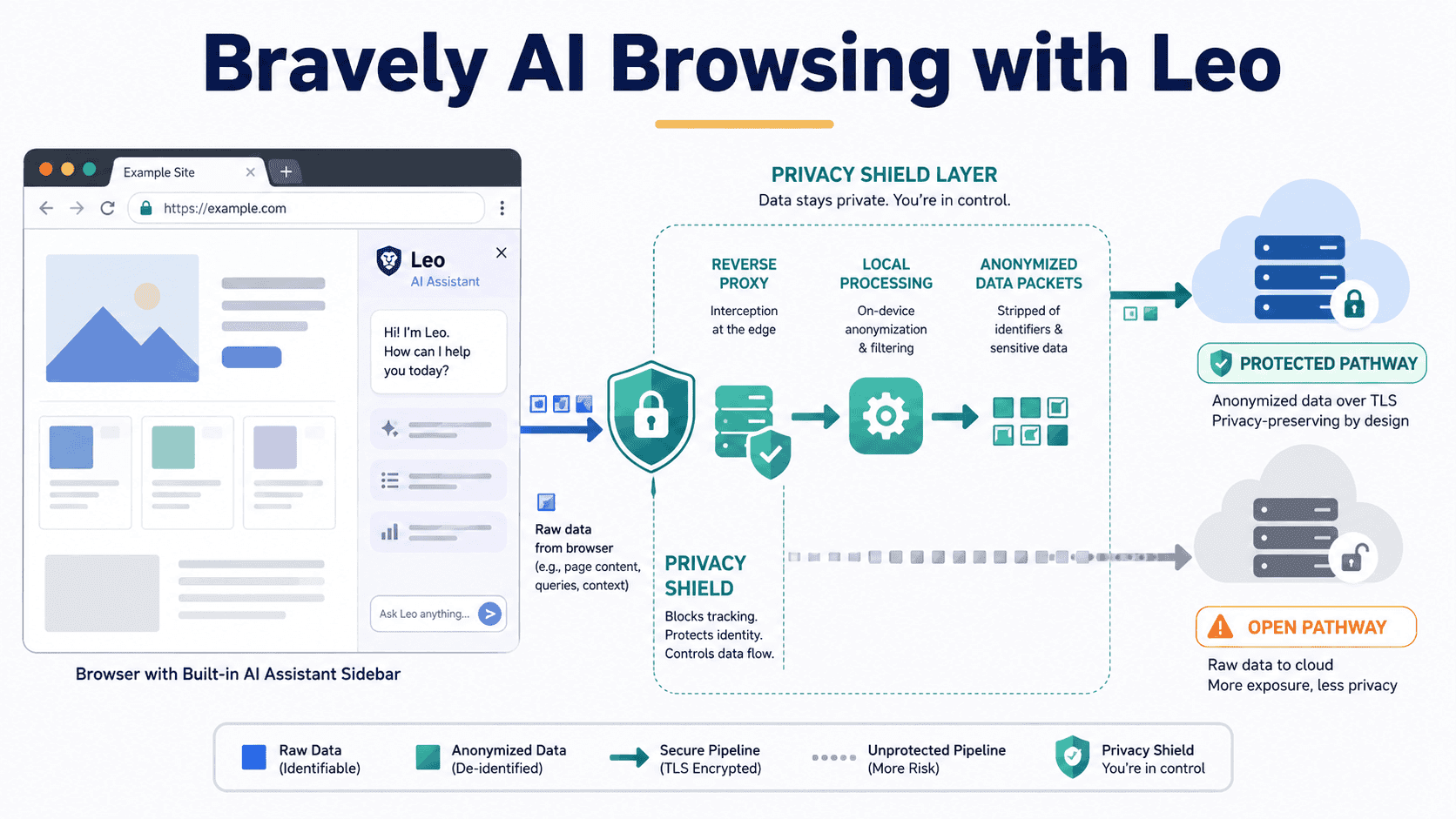
Brave Leo addresses these concerns head-on by prioritizing privacy in its core architecture. It’s built on the principle of "privacy by design." This means that, fundamentally, Leo does not log your conversations, store your IP address, or use your chats for model training. When you interact with Leo, your requests are proxied through an anonymization server, ensuring that Brave cannot link your request to your IP address. Furthermore, responses from Leo are discarded immediately after they're generated and not persisted on Brave's servers.
For data professionals, this verifiable privacy is not a minor benefit; it's a fundamental shift. It allows them to leverage the power of AI for tasks like summarizing proprietary research, analyzing client reports, or drafting code related to sensitive projects, all without the constant worry of data leakage or unintended exposure.
How Brave Leo AI Works at a High Level
Brave Leo functions as an integrated AI assistant within the Brave browser. When you ask Leo a question or give it a command, especially one related to the content of your current tab, it processes this request locally or through Brave's secure infrastructure.
Here’s a simplified breakdown of its high-level operation:
- Contextual Understanding: Leo automatically understands the content of the active web page, PDF, or document without you needing to copy-paste. This "page awareness" is key to its seamless integration.
- Privacy-Preserving Request Routing: Your queries are sent through an anonymization server (a reverse proxy) to Brave's inference infrastructure. This ensures that your IP address and personal identifiers are stripped away, preventing Brave from linking your request to your identity.
- Model Inference: Brave hosts various large language models (LLMs) on its own secure infrastructure, including open-source models like Llama, Qwen, and Gemma, as well as advanced models like Claude Haiku, Claude Sonnet, and DeepSeek V3.1 for premium users. Leo routes your anonymized request to the chosen model for processing.
- Response Generation and Discarding: The AI model generates a response. Crucially, these conversations are not stored on Brave's servers or used for model training. They are discarded immediately after generation.
- Local Interaction and Optional History: While server-side conversations are not retained, chat history can be kept locally on your device if you choose to enable it, giving you control over your personal data.
- Bring Your Own Model (BYOM): For ultimate privacy and customization, Leo supports a "Bring Your Own Model" (BYOM) feature. This allows users to connect Leo to locally running models via tools like Ollama or even their own remote API endpoints. When using local models, all processing happens directly on your device, ensuring that conversations, webpages, and prompts never leave your machine.
Key Features of Brave Leo AI
Leo's feature set has grown significantly since its launch, offering a robust suite of tools for data professionals:
- Content Summarization: Quickly get concise summaries of long articles, technical reports, research papers, PDFs, Google Docs, Google Sheets, or even YouTube videos. This is incredibly useful for quickly grasping the main points of complex documents.
- Content Generation: Leo can assist in drafting emails, writing social media posts, brainstorming ideas for blog posts, or generating various forms of text content.
- Question Answering: Ask specific questions about the content you're viewing or general knowledge questions without needing to open a new tab. Brave Search also pulls in real-time information when required.
- Translation: Translate content between different languages directly within the browser.
- Code Generation & Assistance: Get help with coding questions, generate code snippets, or analyze existing code. This is a powerful feature for data professionals involved in programming and scripting.
- Document Analysis: Beyond web pages, Leo can analyze content from PDFs, Google Docs, and Google Sheets, making it a versatile tool for various data sources.
- Image Understanding: More recently, image understanding capabilities have been added, expanding Leo's multimodal functionality.
- Skills Feature: Launched in December 2025, the "Skills" feature allows users to assign keyboard shortcuts to frequently used prompts, saving time on repetitive tasks.
- Agentic Browsing (Early Access): Introduced in May 2026, agentic browsing allows Leo to autonomously complete multi-step tasks in an isolated browser profile, maintaining privacy by operating within Brave's infrastructure.
- Model Flexibility: Users can switch between various underlying LLMs (Llama, Qwen, Gemma for free; Claude Haiku, Claude Sonnet, DeepSeek V3.1 for premium), offering more control over the AI's capabilities and output style.
- Bring Your Own Model (BYOM): This advanced feature allows you to connect Leo to local AI models (via Ollama or similar frameworks) or your own remote API endpoints, ensuring maximum data privacy as content never leaves your device.
What Brave Leo AI Means for Data Professionals
For data professionals, Brave Leo represents a significant step forward in integrating AI assistance into daily workflows without compromising on privacy and security. Here’s what it means in practical terms:
Enhanced Productivity with Data Security: You can quickly summarize complex research papers or regulatory documents, draft explanations for data models, or generate code snippets for analysis, all while knowing that your proprietary information remains confidential. The ability to interrogate a specific page without copying its contents elsewhere is a critical advantage.
Secure Handling of Sensitive Information: When working with client data, unreleased product specifications, or internal business intelligence, the privacy guarantees of Leo mean you can use AI tools to extract insights, generate reports, or refine queries without the risk of sensitive data being exposed to third-party servers or used for model training.
Streamlined Research and Analysis: Leo's page awareness and ability to analyze various document types (webpages, PDFs, Google Docs, Sheets) simplify research. You can ask questions about content directly, compare information across multiple tabs, and synthesize findings efficiently, all within a secure environment.
Customization and Control with BYOM: The Bring Your Own Model feature is particularly impactful. Data scientists and developers can experiment with specific open-source models running locally, ensuring that their data never leaves their machine. This is ideal for highly sensitive projects or for those who want to fine-tune their AI interactions with models tailored to their specific needs.
Reduced Compliance Risks: For professionals operating under strict data privacy regulations (like GDPR, HIPAA), Leo's architecture helps reduce the risk of non-compliance associated with data processing by third-party AI services. Its unlinkable subscription model further ensures that even paid usage cannot be tied back to your identity.
Pricing and Availability
Brave Leo operates on a freemium model, making its basic capabilities accessible to everyone using the Brave browser.
- Free Tier: The free version of Leo is available to all Brave browser users without requiring an account or login. It provides access to solid open-source models like Llama, Qwen, and Gemma. This tier is suitable for light, occasional use, such as basic summarization, content generation, and question answering. However, it comes with rate limits that might be restrictive for sustained daily use.
- Leo Premium: For professionals requiring more intensive use and access to advanced capabilities, Leo Premium is available. It costs $14.99 per month or $149.99 annually (which works out to about $12.50 per month), with a 7-day free trial. A single Premium subscription covers up to five devices (across Android, Linux, macOS, and Windows). Premium unlocks access to more advanced models such as Claude Haiku, Claude Sonnet, and DeepSeek V3.1, offers higher rate limits, and provides early access to new features. Critically, the Premium subscription maintains the same privacy model; Brave uses unlinkable tokens, meaning your payment information cannot be connected to your usage of the product. Premium users can also opt-in to persistent chat history, which is locally stored.
Brave Leo is available on Windows, macOS, and Linux for desktop, and on Android and iOS for mobile devices.
You can find more detailed information on the Official Brave Leo Page.
Conclusion
Brave Leo offers a compelling solution for data professionals who need the power of AI assistance without sacrificing data privacy and security. By integrating a privacy-first AI assistant directly into the browser, Brave has created a tool that understands the context of your work, helps you with summarization, content creation, coding, and more, all while ensuring your sensitive data remains confidential. The free tier offers a great starting point, while Leo Premium provides access to frontier models and higher usage limits, all under the same robust privacy umbrella. For anyone working with sensitive information, Brave Leo isn't just another AI tool; it's a responsible and powerful extension of your professional toolkit.
Frequently Asked Questions
What makes Brave Leo different from other AI assistants like ChatGPT or Google Gemini?
The primary differentiator for Brave Leo is its unwavering commitment to user privacy. Unlike many other AI assistants, Leo does not log your conversations, store your IP address, or use your chats for model training. Requests are anonymized via a reverse proxy, and responses are discarded immediately after generation. This ensures that your interactions remain private and cannot be linked back to you, which is crucial for data professionals handling sensitive information.
Can I use Brave Leo with my own local AI models?
Yes, Brave Leo supports a "Bring Your Own Model" (BYOM) feature. This allows you to connect Leo to local AI models running on your device (e.g., via Ollama) or to your own remote API endpoints. This offers the highest level of privacy, as your conversations and data never leave your machine, providing complete control over your AI interactions.
Is Brave Leo free to use?
Yes, Brave Leo has a free tier that offers access to open-source models like Llama, Qwen, and Gemma. This free version does not require an account or login and is suitable for basic summarization, content generation, and question answering. For higher rate limits and access to more advanced models like Claude Sonnet and DeepSeek V3.1, a Leo Premium subscription is available for $14.99 per month or $149.99 annually.
What kind of tasks can Brave Leo help data professionals with?
Brave Leo can assist data professionals with a wide range of tasks, including summarizing technical documentation, research papers, and industry reports; generating code snippets or assisting with coding questions; translating content; answering questions about specific webpages or documents; and creating various forms of text content. Its ability to process content from PDFs, Google Docs, and Google Sheets directly within the browser, coupled with its privacy features, makes it ideal for handling sensitive data analysis and research tasks.