Key Takeaways
- Idle GPUs represent a massive waste of resources and money in AI and machine learning, often operating at less than 60% utilization.
- Effective GPU management through virtualization, smart scheduling, and orchestration can significantly cut costs and accelerate AI development.
- Tools like Kubernetes with GPU device plugins, NVIDIA's DCGM, and specialized AI schedulers are essential for optimizing GPU utilization.
- For AI practitioners and businesses, better GPU management means faster model training, quicker innovation, and a stronger return on expensive hardware investments.
In the world of AI and machine learning, Graphics Processing Units (GPUs) are the workhorses. They power everything from training complex deep learning models to running real-time inference. But there's a growing problem that many in the industry are facing: idle GPUs. Imagine a fleet of brand-new, high-performance aircraft sitting grounded on the tarmac, not flying, not generating revenue, just burning through maintenance costs. That's essentially what happens when valuable GPUs sit idle, and for anyone serious about AI, it's a critical issue that needs fixing.
Understanding the GPU's Role in Modern AI
Before diving into why idle GPUs are a problem, let's quickly recap why GPUs are so vital for AI. Unlike a Central Processing Unit (CPU), which is great at handling a few complex tasks sequentially, a GPU boasts thousands of smaller cores. This architecture makes it exceptionally good at performing many simpler calculations simultaneously, a process known as parallel processing.
This parallel power is exactly what deep learning models need. Tasks like matrix multiplications, which are fundamental to neural network training, can be split across hundreds or thousands of GPU cores. This capability drastically reduces model training times—what might take weeks on a CPU can be slashed to days or even hours on a modern GPU. GPUs also provide high memory bandwidth, which is crucial for quickly moving the massive datasets that AI models consume. Without GPUs, many of the breakthroughs we see in AI today, from advanced image recognition to sophisticated natural language processing, would simply not be possible.
The Hidden Cost of Idle GPUs: A Grounded Fleet
The analogy of "grounded aircraft" perfectly captures the dilemma of idle GPUs. Organizations, from startups to large enterprises, invest heavily in these powerful and expensive pieces of hardware. A single high-performance GPU like an NVIDIA H100 can cost tens of thousands of dollars. When these resources are underutilized, it translates directly into significant financial waste.
Studies show a stark reality: average GPU utilization across the industry is often surprisingly low. Some reports indicate that many teams operate at less than 60% utilization, and in some cases, it can be as low as 5-15%. For AI inference workloads, utilization typically hovers around 20-40%, which is considerably lower than for training tasks. On-premise AI clusters can run below 15% utilization. This means that a substantial portion of the capital invested in GPUs is literally sitting idle, not accelerating computations, not driving innovation, and certainly not generating value.
The costs extend beyond the initial purchase price. Idle GPUs still consume power, contributing to operational expenses and a larger carbon footprint. Furthermore, underutilization slows down AI development. Data scientists and ML engineers might face long queues for GPU access, delaying experimentation, iteration, and ultimately, the deployment of AI solutions. This lost productivity is a significant hidden cost.
Why Do GPUs Sit Idle?
Several factors contribute to this widespread underutilization:
- Static Resource Allocation: Often, GPUs are allocated to projects or teams in fixed blocks, even if the workload doesn't consistently require the full capacity. When a job finishes or a developer takes a break, the assigned GPU might sit idle until the next task.
- Inefficient Scheduling: Default scheduling systems, especially in general-purpose environments like Kubernetes, might not be optimized for the unique demands of GPU workloads. This can lead to GPUs waiting for data, for other tasks to complete, or simply being unable to efficiently share resources.
- Data Bottlenecks: GPUs are incredibly fast, but if the data pipeline feeding them is slow (e.g., due to slow storage or inefficient data loading), the GPU will spend a lot of time waiting for data, reducing its effective utilization.
- Lack of Visibility: Without proper monitoring and profiling tools, it's hard for organizations to even know which GPUs are idle, why they're idle, and how to reallocate them.
- Workload Characteristics: Not all AI tasks fully saturate a GPU. Smaller inference tasks, interactive development, or specific training phases might only use a fraction of a GPU's power.
The Solution: Intelligent GPU Management
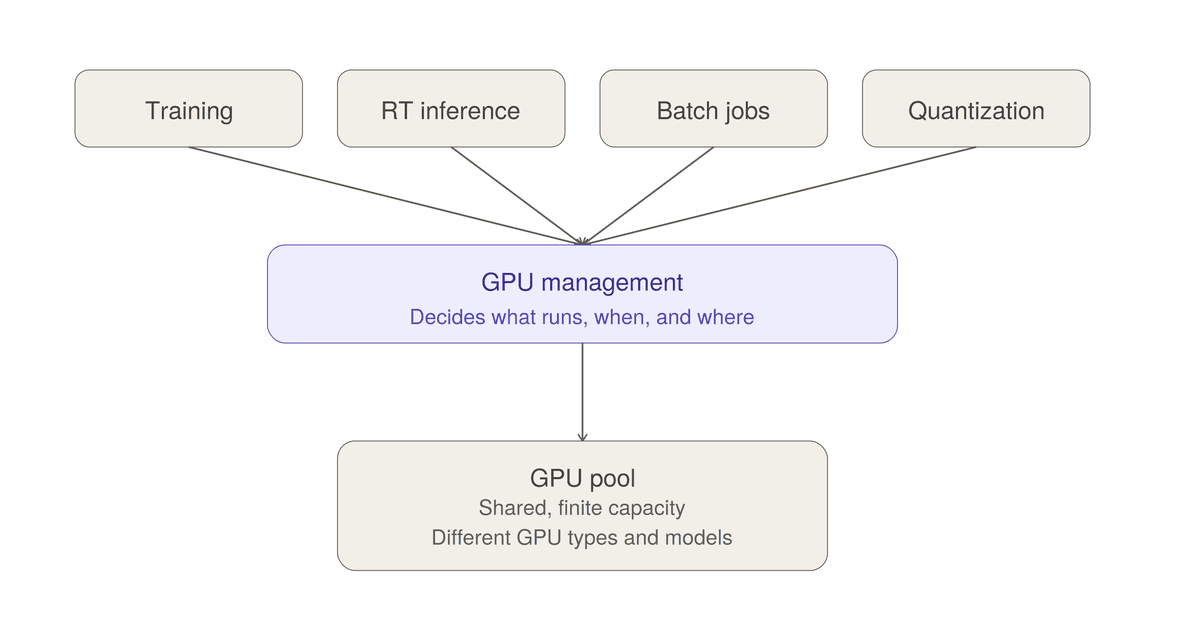
Just as airlines strive to keep their planes flying, AI practitioners and organizations need robust GPU management strategies to keep their accelerators busy. This involves a combination of hardware capabilities, software tools, and smart operational practices.
1. GPU Virtualization and Sharing
One of the most effective ways to combat idle GPUs is by allowing multiple users or workloads to share a single physical GPU. This is achieved through:
- Virtual GPUs (vGPUs): Technologies like NVIDIA vGPU software enable a physical GPU to be divided into multiple virtual instances. Each virtual machine (VM) or container can then access a portion of the GPU's resources, optimizing utilization and providing flexibility. This is particularly beneficial for distributed training, inference, and deep learning at scale.
- Time-Slicing: This software-level technique allows multiple containers to share a single GPU by rapidly switching context between their processes. It's ideal for workloads that aren't constantly compute-intensive, such as Jupyter notebooks for model development or low-traffic inference services. The NVIDIA GPU Operator in Kubernetes can enable time-slicing.
- Multi-Instance GPU (MIG): For high-end NVIDIA GPUs like the A100, H100, and H200, NVIDIA Multi-Instance GPU (MIG) is a hardware-level feature that allows a single GPU to be partitioned into up to seven isolated GPU instances. This provides dedicated memory and fault isolation, making it suitable for diverse workloads that require strict performance guarantees.
2. Container Orchestration with Kubernetes
Kubernetes has become the de facto standard for managing containerized applications, and it plays a crucial role in GPU management. While its default scheduler handles general workloads well, it treats GPUs as indivisible units, which can lead to waste.
However, Kubernetes offers robust extensions for GPU scheduling:
- Device Plugins: Kubernetes supports NVIDIA and AMD GPUs through device plugins, allowing pods to request and consume GPU resources.
- Specialized Schedulers: Projects like NVIDIA KAI (Kubernetes AI Infrastructure) Scheduler are open-source and run alongside the default scheduler. KAI is specifically designed for GPU AI workloads, offering features like gang scheduling (all pods in a job start together or none do) and fair-share queuing to prevent partial scheduling and idle GPUs.
- Autoscaling: Kubernetes can automatically add or remove GPU nodes based on workload demand, optimizing costs and efficiency, especially in cloud environments.
3. Monitoring and Profiling Tools
You can't optimize what you can't measure. Effective GPU management relies heavily on robust monitoring and profiling tools:
-
NVIDIA System Management Interface (
nvidia-smi): This command-line utility, installed with NVIDIA drivers, provides real-time statistics on GPU features like temperature, power consumption, and memory utilization. It's an essential tool for basic monitoring. - NVIDIA Data Center GPU Manager (DCGM): DCGM is a suite of tools for managing and monitoring NVIDIA datacenter GPUs in cluster environments. It offers active health monitoring, diagnostics, system alerts, and governance policies. It can integrate with Kubernetes via the DCGM-Exporter for rich GPU telemetry.
-
nvtopandnvitop: These tools provide real-time, interactive dashboards for NVIDIA GPUs, similar totoporhtopfor CPUs, offering a quick visual overview of GPU activity. - Framework-specific Profilers: Tools like PyTorch Profiler and TensorFlow Profiler help identify bottlenecks within your AI models, showing how efficiently the GPU is being used for specific operations.
4. Cloud GPU Management Platforms
Cloud providers like Google Cloud, AWS, and Azure offer GPU instances and managed services. Specialized platforms and services are also emerging to optimize GPU usage in cloud and hybrid environments:
- Rafay's GPU PaaS: This platform provides automated GPU provisioning, fine-grained utilization insights, and policy-driven orchestration for AI/ML workloads across environments.
- Run:ai (NVIDIA): An enterprise GPU orchestration platform that offers fractional GPUs, time-slicing, and integrates with the KAI scheduler for efficient training and inference.
- Cast AI: A Kubernetes autoscaler that optimizes GPU workloads through bin-packing, spot instance automation, and leveraging time-slicing and MIG to boost utilization.
- SkyPilot: An open-source framework that helps find and provision the cheapest GPU across over 20 cloud providers, with automatic spot instance recovery.
What This Means for AI Practitioners and Freelancers
For individuals and small teams working with AI, efficient GPU management isn't just a technical detail; it's a competitive advantage and a financial necessity:
- Cost Savings: By optimizing GPU utilization, you can reduce cloud compute expenses or maximize the return on your on-premise hardware investment. Organizations can cut cloud GPU costs by up to 40% through better scheduling and workload distribution.
- Faster Iteration and Development: Less time waiting for GPUs means more time for experimentation, model training, and refining your AI solutions. This accelerates your development cycles and time-to-market.
- Scalability: Tools that allow for dynamic allocation and sharing ensure that you can scale your AI projects efficiently, whether you need to burst for a large training run or serve many small inference requests.
- Resource Fairness: In multi-user environments, intelligent schedulers ensure that resources are allocated fairly, preventing one project from monopolizing expensive GPUs.
To truly leverage the power of AI, we must move beyond simply acquiring powerful GPUs. We need to treat them as the valuable, high-performance assets they are, ensuring they are utilized to their fullest potential. By adopting intelligent GPU management strategies and tools, AI practitioners can avoid the costly problem of "grounded aircraft" and keep their AI ambitions soaring.
Frequently Asked Questions
What is GPU management in the context of AI?
GPU management in AI refers to the strategies, tools, and practices used to efficiently allocate, monitor, and optimize Graphics Processing Unit (GPU) resources for machine learning and deep learning workloads. The goal is to maximize GPU utilization, reduce idle time, and control costs while accelerating AI development.
Why are idle GPUs a problem for AI development?
Idle GPUs are a significant problem because they represent wasted financial investment, increased operational costs (due to power consumption), and slower AI development cycles. High-performance GPUs are expensive, and if they're not actively computing, organizations are paying for resources that aren't delivering value.
What are some key technologies used for efficient GPU management?
Key technologies include GPU virtualization (vGPU) and Multi-Instance GPU (MIG) for sharing physical GPUs, container orchestration platforms like Kubernetes with specialized device plugins and AI schedulers (e.g., NVIDIA KAI Scheduler), and comprehensive monitoring tools like NVIDIA DCGM and nvidia-smi.
How can freelancers or small businesses benefit from better GPU management?
Freelancers and small businesses can benefit immensely through cost optimization, faster project completion, and improved scalability. By efficiently managing GPU resources, they can reduce cloud computing expenses, accelerate model training and experimentation, and take on more complex AI projects without needing to invest in excessive hardware.